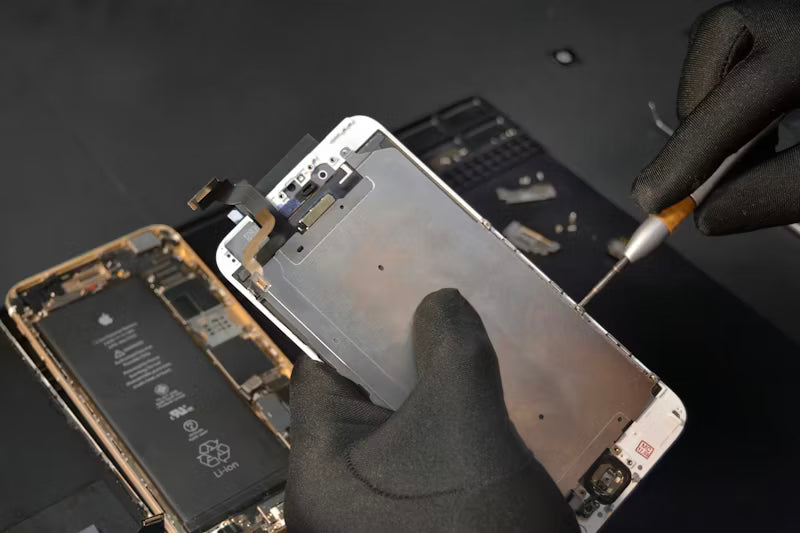
Battery health is the one thing most people forget to check when buying a refurbished phone or laptop — and the one thing that causes the most regret after the fact. A device can look perfect, pass every visual inspection, and still have a battery that drains in three hours. That's not a grading problem. That's a battery health problem, and it's invisible until you're living with it.
If you're buying refurbished tech, understanding battery health isn't optional. It's the most important number on the spec sheet that most listings don't show you. This guide explains how to find it, what it means, and what to do with that information.
Why Battery Health is the Most Hidden Problem in Refurbished Tech
Every rechargeable battery degrades over time. It doesn't matter how well a phone was treated — every charge cycle reduces the battery's maximum capacity slightly. A brand new iPhone battery is rated at 100% capacity. After a year of typical use, that might drop to 90–92%. After two years, 82–85%. After three or more years, some batteries are below 80%, which is where Apple itself flags the battery as significantly degraded.
The problem is that none of this is visible from the outside. A phone with 78% battery health looks identical to one with 96%. The difference only becomes obvious when you're unplugging at 8am and hitting 15% by noon.
This is why battery health is the single most important thing to verify before buying any refurbished device. Cosmetic condition is obvious. Battery health isn't.
How to Check Battery Health on iPhone
Apple makes this straightforward on any iPhone running iOS 11.3 or later.
Go to Settings, then Battery, then Battery Health & Charging. The number you see under Maximum Capacity is your battery health percentage. This tells you what percentage of the original full charge your battery can currently hold.
100% means the battery is brand new or effectively unused. 90–95% is excellent for a used device — barely any degradation. 80–89% is acceptable and normal for a phone that's one to two years old. Below 80% is where you should start asking questions. Apple considers below 80% to be significantly degraded, and at that level you'll notice the difference in daily use.
If you also see a message that says "Your battery's health is significantly degraded" under the capacity number, that's Apple's own system flagging the battery as a problem. Walk away from any refurbished iPhone showing that message unless the price accounts for it heavily.
How to Check Battery Health on MacBook
MacBooks don't show battery health as a simple percentage in the main Settings menu — you need to go one level deeper.
Hold the Option key and click the Apple menu in the top-left corner. Select System Information. In the left sidebar, find Power under the Hardware section. The battery information shown here includes Cycle Count and Condition.
Condition will show as Normal, Replace Soon, Replace Now, or Service Battery. Normal is what you want. Replace Soon means the battery has degraded but is still functional. Replace Now or Service Battery means the battery needs replacing and the device's usage will be significantly affected.
Cycle Count is the other number to check. Apple rates most MacBook batteries to 1,000 charge cycles before they consider the battery consumed. A MacBook with 300 cycles has plenty of life left. One with 900+ cycles is near the end of its battery lifespan regardless of what Condition shows.
What Percentage to Accept on a Refurbished Device
For iPhones, the practical threshold for a refurbished purchase is 85% and above. At 85–89%, you'll still get a full day of typical use from most models. At 90% and above, you'll barely notice any difference from a new battery in day-to-day life.
Below 80% should be a hard pass unless you're buying at a deeply discounted price with full knowledge of what you're accepting. At that level, battery life will be noticeably shorter than the phone's rated performance, and you'll find yourself charging more often than the phone was designed to require.
For MacBooks, cycle count under 500 with a Normal condition rating is the equivalent of the iPhone 85%+ standard. Above 700 cycles, start factoring in the cost of a battery replacement when assessing the value of the deal.
A good refurbished retailer will list battery health on every device before you buy. If a listing doesn't show battery health at all, that's either an oversight or a reason it's priced the way it is.
Red Flags to Watch For
A listing with no battery health information shown. It should be there. If it isn't, ask before buying.
Battery health below 80% listed without a corresponding price reduction that makes sense. You're buying a device that will need a battery replacement — the price should reflect that.
Any iPhone showing the "significantly degraded" system message. This isn't cosmetic. It affects daily use from day one.
A MacBook listed as Condition: Replace Soon or worse. Even if it works fine in a demo, the battery lifespan remaining is short.
Very high cycle counts on a MacBook listed as refurbished without acknowledgment. A MacBook with 950 cycles on a 1,000-cycle battery isn't refurbished in any meaningful sense as far as battery life is concerned.
FAQ
What is a good battery health percentage for a refurbished iPhone?
85% and above is the practical threshold for a refurbished purchase. At 85–89% you'll get a full day of normal use. At 90% and above you'll barely notice any difference from a new device.
Does Apple replace batteries in refurbished iPhones?
Apple Certified Refurbished devices include a new battery as standard. Third-party refurbishers vary — a reputable retailer will list the battery health on every device and replace batteries that fall below their stated threshold.
What does it mean if my iPhone says "service recommended" under battery?
It means Apple's system has flagged the battery as significantly degraded. At that point the battery holds less than 80% of its original capacity and daily performance will be noticeably affected.
How many MacBook battery cycles is too many?
Apple rates most MacBook batteries to 1,000 cycles. Above 700 cycles, factor in a battery replacement cost when assessing the deal. Above 900 cycles on a device being sold as refurbished is a red flag.
Can you check battery health before buying a refurbished phone?
You should be able to. A reputable retailer lists battery health on the product page. If it isn't listed, ask — and if they can't tell you, that tells you something about how the device was assessed.
About Tech Pasar
Tech Pasar tests and lists battery health on every device we sell. We don't list units with severely degraded batteries — our minimum battery health standard is stated on each product page so you know exactly what you're buying before checkout. Every device is individually inspected, graded, and verified before it goes on sale. No hidden surprises, no vague condition descriptions. Just clear information so you can make the right call.